Weird Shape Brush & Vector PNG: Unusual Design Ornaments
Design often falls into the trap of the predictable. We rely on perfect circles, sharp squares, and standard geometric grids because they are safe. However, true visual impact frequently comes from breaking those rigid structures. This is where the Weird Shape Brush, Vector PNG collection becomes an essential tool for modern creators. It is not just a set of files; it is a catalyst for moving away from sterile layouts toward something with more personality, movement, and organic energy.
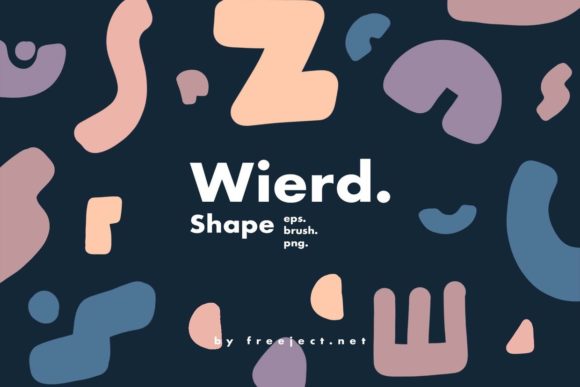
This collection serves as a bridge between digital precision and hand-drawn imperfection. By offering unusual shaped graphics, it allows designers to create ornaments that feel alive rather than manufactured. Whether you are working on fabric pattern design, product packaging, or complex print design, these assets provide the raw material needed to build unique visual identities. The versatility lies in the format diversity: you get raster flexibility with Photoshop brushes and PNGs, alongside the infinite scalability of vector EPS files.
Bridging Raster and Vector Workflows
One of the most practical advantages of this specific toolkit is how it respects different workflows. In the design world, professionals often have to choose between the texture of raster images and the clean lines of vectors. This collection eliminates that compromise by including three distinct file types tailored for specific needs.
For those who love the tactile feel of digital painting, the ABR (Photoshop Brush) file is a game-changer. Instead of placing static images, you can paint with these weird shapes directly onto your canvas. This allows for organic clustering, varying opacity, and natural overlapping that mimics how a human hand would arrange physical cutouts. It is ideal for creating background textures or adding subtle noise to a composition without it looking like a repetitive digital pattern.
Conversely, the EPS file ensures that your design remains crisp regardless of scale. If you are designing a large-format billboard or a small business card, vector graphics guarantee that edges remain sharp. This is crucial for print design where resolution issues can ruin a final product. You can manipulate the anchor points of these weird shapes to customize them further, making them truly yours before exporting.
Rounding out the package are 39 individual PNG files. These are ready-to-use assets perfect for quick mockups, social media graphics, or web design where transparency is key. They allow for rapid prototyping. You can drag, drop, and recolor instantly to test how a weird shape interacts with your typography or product photography.
Exploring Color Palettes and Aesthetic Styles
The form of a shape is only half the story; color dictates the mood. The neutral nature of these black-and-white or base-layer shapes invites you to experiment with diverse color theories. Because the shapes themselves are unconventional, they act as a perfect canvas for bold stylistic choices.
Consider the Retro and Vintage aesthetic. By applying muted earth tones, mustard yellows, and burnt oranges to these irregular forms, you can instantly evoke the feeling of 1970s album covers or old-school cereal boxes. The imperfect nature of the shapes complements the grainy textures often associated with vintage design. Layering these shapes behind distressed typography creates a cohesive, nostalgic look that resonates with audiences seeking authenticity.
On the other end of the spectrum, these graphics shine in Pop Art and Pastel combinations. High-contrast neon colors against a dark background can make the weird shapes pop with electric energy, suitable for music festival posters or streetwear branding. Alternatively, soft pastel gradients can transform the same jagged or blob-like shapes into something dreamy and approachable, perfect for wellness brands, baby products, or lifestyle blogs. The ability to shift from aggressive to gentle simply by changing the hex codes demonstrates the adaptability of the collection.
Practical Applications Across Industries
The utility of the Weird Shape Brush, Vector PNG extends far beyond abstract art. Different industries can leverage these ornaments to solve specific communication problems.
- Fabric and Textile Design: Repeat patterns are the backbone of the textile industry. Using the brush tool, you can scatter these shapes to create seamless, non-grid-based patterns that feel more organic than traditional tile repeats. This works exceptionally well for activewear, where dynamic shapes suggest movement, or home decor, where unique motifs add character to pillows and curtains.
- Product Packaging: In a crowded retail environment, shelf presence is everything. Standard packaging often relies on clean, corporate geometry. Introducing weird shapes as framing elements or background textures can disrupt the consumer's scanning pattern, drawing the eye to your product. For example, a craft coffee brand could use these shapes to frame nutritional information, making the label feel artisanal rather than industrial.
- Digital Marketing and Social Media: Content creators need to stop the scroll. Using these PNGs as overlays on Instagram stories or YouTube thumbnails adds a layer of depth. They can be used to highlight key text, frame a product shot, or simply add visual interest to a plain background, increasing engagement rates through better aesthetics.
- Educational Materials: Educators and publishers can use these shapes to break up dense text in worksheets or presentations. They serve as engaging bullet points or section dividers that keep students interested without being distracting cartoons.
Maintaining Clarity and Consistency
While "weird" implies chaos, effective design requires control. When incorporating unusual shapes into a project, the risk is creating a cluttered or confusing visual hierarchy. To keep results clear and audience-friendly, consider these practical guidelines:
Establish a Visual Rhythm. Even if the shapes are irregular, their distribution should follow a logic. If you are using the brush to create a border, ensure the density of the shapes remains consistent. If you are scattering them across a background, vary the size but maintain a balanced whitespace ratio so the design breathes.
Limit Your Palette. Because the shapes themselves are complex, pairing them with too many colors can result in visual noise. Stick to a defined color scheme—perhaps two primary colors and one accent. This grounds the weirdness and makes the design feel intentional rather than random.
Prioritize Legibility. If these ornaments are used near text, ensure there is sufficient contrast. Do not let the intricate details of a vector shape interfere with the readability of your headline. Sometimes, lowering the opacity of the shape layer or blurring it slightly can push it into the background just enough to let the content shine.
Fueling Originality in a Saturated Market
In an era where templates are ubiquitous, originality is a premium currency. Freelancers and small business owners often struggle to differentiate their brands when everyone is using the same stock libraries. This collection offers a middle ground: it provides professional-grade assets that are distinct enough to prevent your work from looking generic, yet versatile enough to fit various brand voices.
By combining the ABR, EPS, and PNG files, you can create hybrid compositions that no one else has. Perhaps you use the vector file to create a custom mask, fill it with a gradient, and then overlay the PNG texture for grit. These small layers of customization accumulate to form a unique style signature. It encourages a mindset of remixing and adapting rather than just consuming.
Ultimately, the value of this toolkit lies in its ability to spark ideas. It challenges you to ask, "What happens if I rotate this?" or "How does this look in neon green?" It is a practical resource for anyone looking to inject a dose of creative unpredictability into their projects while maintaining the technical standards required for professional output. Whether you are a seasoned graphic designer or a hobbyist exploring digital art, these tools empower you to make marks that matter.