Unlocking Creative Potential with Botanica Doodle Stamps in Procreate
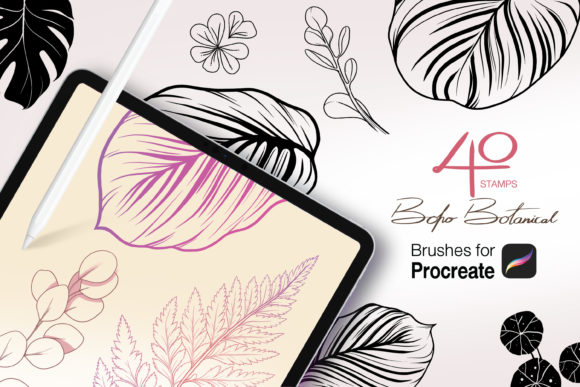
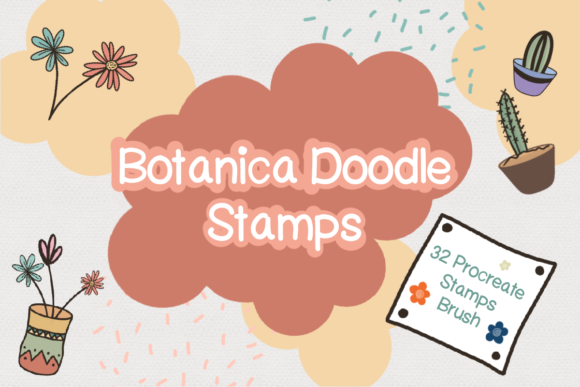
Digital art often feels like a balancing act between technical precision and organic flow. For many creators, the desire to add hand-drawn charm to their work is constantly battling against tight deadlines or a lack of confidence in freehand drawing. This is where Botanica Doodle Stamps steps in as a transformative tool for your digital workflow. Designed specifically for the Procreate ecosystem, this collection of 32 stamp brushes offers an immediate way to infuse botanical whimsy into your projects without needing to master complex illustration techniques from scratch. Whether you are a seasoned graphic designer, a planner enthusiast, or a small business owner looking to elevate your brand aesthetics, understanding how to properly integrate these assets can save you hours of work while significantly improving the quality of your output.
The appeal of botanical doodles lies in their versatility. They bridge the gap between professional polish and approachable warmth. However, simply downloading a brush set does not guarantee stunning results. Many users fall into the trap of treating stamp brushes as a "one-click fix," slapping them onto a canvas without considering composition, scale, or color harmony. When used thoughtfully, Botanica Doodle Stamps can become the cornerstone of a cohesive visual identity. When used poorly, they can make a design look cluttered, generic, or disjointed. The difference lies in how you approach the integration of these tools into your broader creative process.
Common Pitfalls When Using Digital Stamp Brushes
One of the most frequent mistakes creators make is ignoring the resolution and scale of stamp brushes. Because these are pre-drawn elements, there is a temptation to stretch or shrink them indiscriminately to fit a layout. If you enlarge a stamp too much, you risk pixelation or losing the crispness of the original line work, which immediately signals low-quality production to your audience. Conversely, shrinking them too small can cause delicate details to vanish, especially on mobile screens or printed materials. Before you begin decorating your art, take a moment to test the limits of each brush in the set. Create a test layer and tap the stamp at various sizes to find the "sweet spot" where the line weight remains consistent and clear.
Another overlooked detail is the failure to customize the default colors. Out of the box, these stamps usually appear in black or a single default hue. Leaving them this way can make your artwork look like a template rather than a custom creation. A common misunderstanding is that stamp brushes are rigid and cannot be altered. In reality, Procreate allows you to change the color of any stroke instantly using the ColorDrop feature or by adjusting the layer blend modes. By recoloring your botanical elements to match your specific palette, you ensure that the doodles feel like an intentional part of the piece rather than an afterthought. This simple step transforms a generic asset into a bespoke design element.
Composition is also where many beginners stumble. There is a tendency to scatter stamps randomly across the canvas in an attempt to fill empty space. This often results in a chaotic visual experience that distracts from the main message or subject. Effective use of Botanica Doodle Stamps requires a sense of balance. Think of these elements as accents, similar to jewelry on an outfit; they should enhance the overall look without overwhelming it. Try grouping elements to create borders, framing a central text block, or building a corner flourish. Intentional placement guides the viewer's eye and adds structure to your digital stickers or Instagram posts.
Maximizing Efficiency and Workflow
For entrepreneurs and freelancers, time is a currency. One of the greatest advantages of this brush set is its ability to speed up the creation of marketing materials. However, efficiency can be lost if you do not organize your layers correctly. A frequent error is stamping all elements onto a single layer. While this seems faster initially, it creates a nightmare if you need to move a leaf or change the color of a specific flower later. Always stamp new elements onto fresh layers or group them logically. This non-destructive workflow ensures that you can tweak individual components without redoing the entire design. It is a small habit that pays massive dividends when clients request revisions or when you need to adapt a design for different platforms.
Furthermore, many users underestimate the power of mixing these stamps with other brushes. The prompt mentions that these can be mixed and matched, yet some treat them as isolated tools. The magic happens when you combine the structured nature of the Botanica Doodle Stamps with loose, textured sketching brushes. Use a rough charcoal brush to draw a background shape, then overlay the crisp botanical stamps to create contrast. This layering technique adds depth and tactile interest that flat designs often lack. It prevents the "sticker book" look where elements appear to be floating disconnectedly on a white void.
Technical Setup and Installation Best Practices
Before you can avoid creative mistakes, you must ensure the technical foundation is solid. The product includes one ZIP file containing the Procreate brush set. A common point of confusion arises during the installation process, particularly for those new to iPadOS. Users sometimes try to open the ZIP file directly within the Procreate app, which will not work. The correct approach is to unzip the file in the iPad's Files app first. Once extracted, tapping the `.brushset` file will automatically trigger Procreate to install the brushes. If you skip the unzipping step, you may encounter error messages or find the brushes missing from your library, leading to unnecessary frustration.
Once installed, verify that the brushes appear in your Brush Library under the correct category. It is also wise to back up your brush sets. Digital files can occasionally be corrupted or lost if the app crashes or the device is reset. Keeping a copy of the original ZIP file in a cloud storage service ensures that you can reinstall Botanica Doodle Stamps whenever needed, protecting your investment and maintaining workflow continuity.
Making the Right Choice for Your Projects
When evaluating whether this tool fits your needs, consider the specific mediums you work in. If your primary focus is creating digital planners, these stamps are ideal for generating decorative dividers, checklist bullets, and cover art. For social media managers, they serve as excellent overlays for stories and posts, adding a branded, hand-crafted feel to promotional content. Educators can use them to create engaging worksheets or presentation slides that feel less sterile than standard clipart. The key is to align the aesthetic of the doodles with your brand voice. If your brand is minimalist and corporate, you might use these stamps sparingly as subtle textures. If your brand is playful and lifestyle-oriented, you can lean heavily into the botanical theme.
Ultimately, the value of Botanica Doodle Stamps is not just in the images themselves, but in how they empower you to create faster and with more confidence. By avoiding the traps of poor scaling, lazy coloring, and disorganized layering, you unlock the full potential of these 32 unique brushes. Remember that tools are only as good as the strategy behind them. Take the time to experiment, respect the technical requirements of installation, and always prioritize intentional design over speed. With these practices in place, you will find that adding botanical charm to your digital art becomes a seamless and enjoyable part of your creative routine.