Mastering the Basuu Lettering Brush in Procreate
Digital lettering has evolved from a niche skill into an essential tool for modern creatives. Whether you are designing social media graphics, crafting custom logos, or illustrating children’s books, the right brush can transform your workflow. The Procreate Lettering Brush - Basuu stands out as a versatile asset for artists who value texture, control, and organic flow. Unlike standard digital pens that often feel too sterile or uniform, this brush introduces a subtle, hand-crafted quality to your strokes, bridging the gap between traditional ink work and digital precision.
For designers, marketers, and hobbyists alike, integrating a specialized tool like Basuu into your repertoire opens up new avenues for expression. It is not just about writing words; it is about conveying tone, emotion, and brand identity through typography. This guide explores how to install, utilize, and maximize the potential of this brush, ensuring your lettering projects remain fresh, professional, and engaging.
Getting Started: Installation and Setup
Before diving into creative applications, ensuring your tools are correctly set up is crucial. The Procreate Lettering Brush - Basuu typically arrives as a compressed file, requiring a few simple steps to integrate into your iPad workflow. Many users encounter minor hurdles during this process, but with the right approach, it becomes seamless.
To begin, you will receive a ZIP file containing the lettering Procreate brush. iOS does not always handle these files natively within Procreate, so using a free app like FileExplorer File Manager or iZip is recommended to unzip the file first. Once extracted, look for the option to "Open in Procreate." If this direct option is not available, do not worry. You can manually import the brush by opening a new canvas in Procreate and tapping the paintbrush icon to access the Brushes panel. From there, tap the plus button or the import option located above the list of brushes. Navigate to the folder containing your downloaded Procreate brush file, select it, and it will load directly into your library. This straightforward process ensures you spend less time troubleshooting and more time creating.
Why Choose the Basuu Brush?
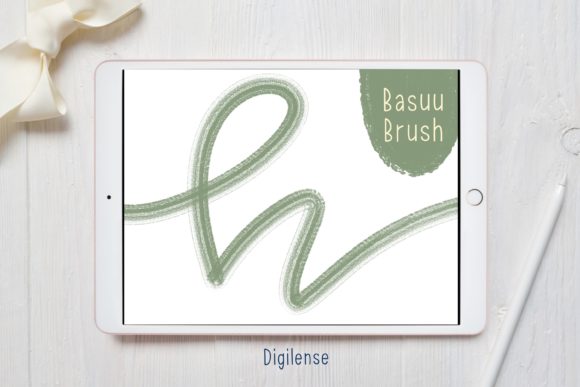
The appeal of the Procreate Lettering Brush - Basuu lies in its balanced response to pressure and tilt. Traditional calligraphy brushes can sometimes feel slippery on glass screens, making it difficult to control line weight. Basuu mitigates this by offering a textured grip that mimics the friction of paper. This characteristic is particularly beneficial for creators who want their digital work to retain an authentic, hand-drawn aesthetic.
Moreover, the brush is designed to handle varying speeds gracefully. Fast strokes produce sleek, tapered ends, while slower movements allow for thicker, more deliberate lines. This dynamic range makes it suitable for both bold headlines and delicate script details. For entrepreneurs and small business owners creating their own marketing materials, this versatility means you can maintain brand consistency across different formats without needing multiple specialized brushes.
Creative Applications and Project Ideas
Understanding the technical aspects is only half the battle. The true value of any tool is revealed in its application. Here are several ways different professionals can leverage the Basuu brush to enhance their projects.
Social Media and Content Creation
In the fast-paced world of social media, eye-catching typography is key to stopping the scroll. Marketers and bloggers can use the Basuu brush to create custom quote graphics that stand out from generic template designs. The organic texture of the brush adds a personal touch that resonates with audiences seeking authenticity. Try combining thick downstrokes with thin upstrokes to create high-contrast scripts that remain legible even on small mobile screens.
Branding and Logo Design
Freelancers and designers often face the challenge of creating unique logotypes that feel bespoke. The Procreate Lettering Brush - Basuu allows for rapid iteration of letterforms. You can sketch out multiple variations of a brand name quickly, experimenting with ligatures and flourishes. Because the brush retains a natural irregularity, the resulting logos feel human-centric rather than mechanically perfect. This is ideal for brands in the wellness, artisanal, or creative sectors where warmth and approachability are paramount.
Educational Materials and Planning
Educators and planners can utilize this brush to design engaging worksheets, headers, or journal layouts. The clarity of the brush stroke ensures that text remains readable, while the stylistic flair keeps students or users engaged. For instance, creating highlighted headers for study guides using Basuu can help organize information visually, making complex topics more digestible.
Techniques for Polished Results
To keep your results clear, effective, and organized, consider adopting a structured approach to your lettering process. Even with a high-quality brush like Basuu, technique plays a significant role in the final output.
- Layer Management: Always sketch your basic letterforms on a separate layer using a simple pencil brush. Once satisfied with the composition, create a new layer above it for your Basuu lettering. This non-destructive workflow allows you to refine shapes without ruining your underlying structure.
- Consistency in Pressure: Practice maintaining consistent pressure for straight lines and varying it intentionally for curves. The Basuu brush responds well to subtle changes, so avoid pressing too hard unless you specifically want a heavy, ink-blot effect.
- Color and Contrast: While black on white is classic, experiment with deep navies, charcoals, or muted earth tones to soften the look. Ensure there is sufficient contrast between your lettering and the background to maintain accessibility and readability.
- Use of Guides: Activate Procreate’s drawing guides to establish baseline, x-height, and cap-height lines. This ensures your lettering remains aligned and professional, especially when working on longer phrases or sentences.
Adapting to Different Audiences and Contexts
One of the strengths of the Procreate Lettering Brush - Basuu is its adaptability. A publisher might use it for chapter headings in an eBook, aiming for a literary, timeless feel. Meanwhile, a startup founder might use the same brush for pitch deck titles, injecting personality into corporate presentations. The key is adjusting the scale and spacing.
For formal contexts, increase the spacing between letters (kerning) and keep flourishes minimal. This creates a sense of elegance and order. For casual or playful contexts, such as greeting cards or event invitations, allow the letters to connect more freely and add decorative swashes. Understanding your audience helps determine how much "personality" to inject into the lettering. A tech-savvy younger demographic might appreciate bold, experimental layouts, while a professional B2B audience may prefer clean, understated elegance.
Maintaining Originality and Flow
In a digital age where templates are abundant, originality is a valuable currency. Using a custom brush like Basuu is a step toward distinguishing your work. However, true originality comes from how you combine tools with your unique voice. Do not rely solely on the brush’s default settings. Experiment with opacity, flow, and stabilization settings within Procreate to tweak the brush behavior to match your hand movement.
Furthermore, study traditional calligraphy principles. Understanding the anatomy of letters—serifs, terminals, bowls, and counters—will help you manipulate the Basuu brush more effectively. When you understand why a letter looks balanced, you can recreate that balance digitally with greater confidence. This foundational knowledge ensures that your work remains grounded in design principles, regardless of trends.
Ultimately, the Procreate Lettering Brush - Basuu is more than just a digital tool; it is a conduit for creativity. By mastering its installation, understanding its nuances, and applying it with intention, you can elevate your design work. Whether you are a seasoned designer or a curious beginner, this brush offers the flexibility and character needed to bring your typographic visions to life. Embrace the learning curve, practice consistently, and let your unique style shine through every stroke.