Hands Clipart and Procreate Stamps for Digital Art
Digital illustration has shifted dramatically in recent years, moving away from rigid vector lines toward textures that feel organic and human. At the heart of this shift are tools that allow creators to inject personality into their work instantly. Hands Clipart and Procreate Stamps represent a specific niche within this movement, offering a collection of gesture-based elements designed to bridge the gap between technical precision and artistic expression. Whether you are sketching a quick concept or finalizing a brand identity, having a reliable set of hand-drawn assets can drastically reduce production time while elevating the visual quality of your output.
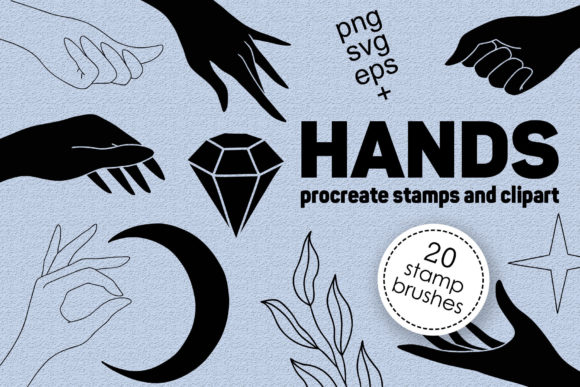
This particular collection stands out because it addresses a common frustration among iPad artists: the difficulty of drawing consistent, clean hand gestures without spending hours on anatomy studies. The set includes 20 distinct hand brushes and stamps available in multiple formats, ensuring compatibility across various workflows. You receive four dedicated brush sets optimized for the Procreate app, alongside individual files in EPS, SVG, and PNG formats. This versatility means you aren't locked into a single ecosystem; you can use the rasterized PNGs for quick compositing or the vector EPS and SVG files for scalable logo design and print work. The inclusion of both line art and solid black variations provides immediate flexibility for different lighting conditions and background colors.
Visual Characteristics and Stylistic Appeal
The aesthetic of these stamps leans heavily into modern minimalism mixed with a touch of raw, sketched energy. Unlike overly polished stock vectors that can feel sterile, these elements retain the subtle imperfections of a real pen stroke. This "imperfect perfection" is crucial for contemporary brand identity projects where authenticity often trumps symmetry. The line weights are generally consistent but show natural tapering, mimicking the pressure sensitivity of an Apple Pencil. This makes them ideal for pairing with a handwritten font or a clean sans serif font to create a balanced composition.
When examining the 20 elements included in the package, you will notice a focus on universal gestures—pointing, holding, open palms, and grasping motions. These are the building blocks of visual storytelling. In terms of style, they function similarly to a high-quality display font; they demand attention and serve as focal points within a layout. The black silhouette versions offer bold contrast, perfect for creating icons or stamp-style logos, while the line art versions integrate seamlessly into intricate illustrations without overpowering surrounding details. This duality allows designers to maintain a cohesive look across different media, from social media graphics to large-format packaging design.
Practical Applications Across Creative Industries
The utility of Hands Clipart and Procreate Stamps extends far beyond simple digital painting. For entrepreneurs and small business owners, these assets are invaluable for creating unique marketing materials without hiring an illustrator for every single project. Imagine developing a series of Instagram stories where a hand points to a new product launch or holds a testimonial quote. Using a custom stamp adds a layer of professionalism and brand recognition that generic clip art simply cannot match.
In the realm of editorial design and publishing, these elements can break up dense text blocks, acting as visual anchors that guide the reader's eye. A pointing hand can direct attention to a key statistic in a report, while an open palm might suggest invitation or explanation in an instructional guide. For web design, the SVG files are particularly useful. Because they are vector-based, they scale infinitely without losing resolution, making them perfect for responsive interfaces where icons need to look crisp on both mobile screens and desktop monitors.
Furthermore, these stamps are excellent for logo design. Many modern brands are moving away from complex emblems toward simpler, gesture-based marks that convey action and human connection. By combining one of these hand stamps with a strong typeface, you can create a memorable logomark that feels personal and approachable. The availability of separate files for each element means you can easily manipulate individual hands, rotating or resizing them to fit specific compositional needs without disturbing the rest of your artwork.
Technical Requirements and Workflow Integration
To get the most out of the brush sets, you will need an iPad Pro or a standard iPad paired with an Apple Pencil or a stylus that supports pressure sensitivity. The brushes are engineered specifically for Procreate version 5.0 and higher, leveraging the app's advanced rendering engine to simulate realistic ink flow and texture. It is important to note that these .brushset files are proprietary to Procreate; they will not function in Photoshop, Illustrator, or other desktop software. However, the inclusion of EPS, SVG, and PNG files ensures that the design assets remain usable across your entire toolkit. You can import the vectors into Adobe Illustrator for further manipulation or drop the PNGs directly into a Photoshop composite.
Integrating these stamps into your workflow is straightforward. Once the ZIP file is downloaded and unpacked, you can import the brush sets directly into Procreate by tapping on the file. For the vector files, dragging and dropping them into your preferred vector editor works instantly. This seamless integration respects the time constraints of professional creatives, allowing you to move from idea to execution rapidly. The separation of files also aids in organization; having each element in a separate PNG prevents the clutter often associated with large sprite sheets, making asset management much more efficient.
Enhancing Brand Perception and Readability
Visual hierarchy is critical in communication design, and hand gestures are powerful tools for establishing it. When used correctly, these stamps influence how an audience processes information. A hand pointing to a call-to-action button increases click-through rates by directing focus, while a hand holding a product creates a sense of scale and tangibility. In terms of readability, placing these elements near headlines or key takeaways helps segment content, making it less intimidating for the reader.
Consistency is another major factor in brand perception. By sticking to a specific set of illustrated hands, you create a visual language that becomes synonymous with your brand. Over time, audiences begin to recognize these stylistic cues, fostering trust and familiarity. This is especially true for content creators and marketers who publish frequently across multiple platforms. Using the same style of creative font alongside consistent hand illustrations creates a unified front that looks intentional and strategic rather than haphazard.
Selecting the Right Assets for Your Project
Choosing the right elements from the set requires a clear understanding of your project's tone. If you are aiming for a bold, authoritative look, the solid black stamps paired with a heavy serif font might be the best route. Conversely, if the goal is a light, airy, and friendly vibe, the line art versions combined with a delicate script font would work better. Always test your font pairing before finalizing the design. Place the hand stamp next to your chosen typography to ensure the line weights complement each other rather than compete.
It is also wise to consider the context of use. For commercial licensing, ensure that the specific terms of the download cover your intended application, especially if you are creating products for resale. While these assets are designed for versatility, evaluating the fit for your specific medium—whether it is a digital ad or a printed brochure—is essential. Look at the negative space within the line art versions; sometimes, the way the lines break can interact beautifully with background textures or colors, adding depth to a flat design.
Ultimately, Hands Clipart and Procreate Stamps offer a practical solution for adding a human touch to digital work. They eliminate the barrier of entry for those who struggle with drawing anatomy while providing seasoned illustrators with high-quality base elements to build upon. By leveraging these tools, you can focus more on the storytelling aspect of your design and less on the technical execution of every single stroke, resulting in work that is both efficient and emotionally resonant.