Enhancing Digital Art with Washi Tape Procreate Stamp Brushes
In the evolving landscape of digital illustration, texture and tactile elements play a pivotal role in bridging the gap between the screen and traditional media. For artists using Apple’s powerful iPad application, the Washi Tape Procreate Stamp Brush has emerged as an essential tool for adding depth, whimsy, and organization to digital layouts. Whether you are a professional graphic designer, a journaling enthusiast, or a social media content creator, understanding how to effectively integrate these digital assets can significantly elevate the quality of your work.
This article explores the utility, features, and practical applications of hand-drawn washi tape stamps, offering a comprehensive guide for users of Procreate 5x or later. By focusing on usability and creative potential, we aim to help you determine if this digital resource aligns with your artistic workflow.
The Appeal of Digital Texture in Modern Design
Traditional washi tape—a decorative adhesive tape made from natural fibers like hemp, bamboo, or rice—has long been a staple in physical scrapbooking and bullet journaling. Its semi-translucent nature and matte finish provide a soft, organic look that plastic tapes cannot replicate. Translating this aesthetic into the digital realm requires more than just a simple image overlay; it demands a tool that respects the user’s interaction with the canvas.
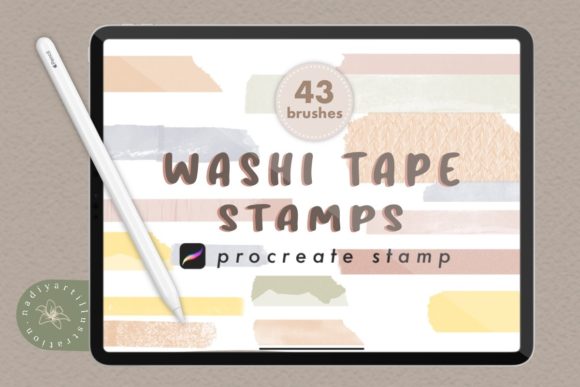
A Procreate brush stamp designed to mimic washi tape offers this interactivity. Unlike static images that must be manually resized and rotated for every use, a stamp brush allows for rapid, intuitive placement. This efficiency is crucial for professionals working under tight deadlines and hobbyists who value a seamless creative flow. The Hand Drawn Washi Tape Stamps for Procreate capture the imperfections and textures of real tape, ensuring that your digital creations retain a human touch rather than appearing sterile or overly processed.
Technical Specifications and Quality Standards
When evaluating digital art resources, resolution and compatibility are paramount. High-quality Washi Tape stamp brushes are typically rendered at 300 DPI (dots per inch). This resolution standard ensures that your artwork remains crisp and clear, whether it is viewed on a high-resolution Retina display or printed for physical distribution. Low-resolution assets can appear pixelated when scaled, detracting from the professional quality of the final piece.
It is important to note that these specific tools are designed FOR PROCREATE 5X OR LATER ONLY. This requirement ensures that users can take advantage of the latest brush engine optimizations and file formats supported by the app. Older versions may not support the .brushset format correctly, leading to installation errors or degraded performance.
What You Get: Understanding the File Structure
Purchasing or downloading a premium set of digital tapes usually involves receiving a compressed archive. Specifically, you will receive one ZIP file containing two sets of Procreate brush files (.brushset). This structure is designed for organizational ease:
- Set 1: Often contains standard widths or solid colors, ideal for bordering and framing.
- Set 2: Typically includes patterned, textured, or translucent variations for layering and decorative accents.
Upon unzipping the file on your iPad, tapping each .brushset file will automatically import the brushes into your Procreate library. This straightforward installation process minimizes technical friction, allowing you to start creating immediately.
Practical Applications for Creators and Businesses
The versatility of a Digital Tape stamp for Procreate extends far beyond simple decoration. Different industries and creative disciplines can leverage these tools to solve specific design challenges.
Digital Planning and Journaling
For the booming community of digital planners, washi tape stamps are indispensable. They serve as functional dividers, helping to separate days, weeks, or thematic sections within a digital journal. Because the brushes are stamp-based, users can quickly create consistent headers without drawing each line manually. The semi-transparent nature of the Washi tape Stamp allows underlying text or grid lines to remain visible, maintaining the readability of the planner while adding visual interest.
Social Media Content Creation
Influencers and small business owners often need to create eye-catching graphics for Instagram stories, Pinterest pins, or TikTok covers. Hand-drawn elements perform exceptionally well in these contexts because they feel authentic and approachable. Using a Stamp brush to add a piece of "tape" holding a photo or a quote box can create a collage aesthetic that is currently trending in social media design. This method is faster than using complex layer masks or vector tools, making it ideal for daily content production.
Graphic Design and Branding
Professional designers may use these brushes for mockups or informal branding materials. For example, a bakery might use cute, pastel-colored washi tape stamps to frame menu items in a digital flyer. The Hand Drawn Washi tape Stamp adds a artisanal feel that aligns with handmade or boutique brand identities. While not suitable for large-format print advertising due to the raster nature of brushes, they are perfect for web graphics, email newsletters, and digital brochures.
Evaluating Suitability: Is This Tool Right for You?
Before integrating new assets into your workflow, it is wise to assess your specific needs. Not every project benefits from decorative stamps, and understanding the limitations helps manage expectations.
- Project Scale: If you are working on vector-based logos that need to be scaled infinitely, raster-based Procreate brushes are not the right tool. However, for fixed-size digital outputs like social media posts or standard prints, they are excellent.
- Style Consistency: These brushes work best for organic, hand-crafted, or cozy aesthetics. If your brand identity is strictly minimalist, corporate, or futuristic, washi tape elements may clash with your visual language.
- Workflow Speed: If you frequently find yourself spending too much time drawing repetitive borders or frames, a stamp brush will save you hours. If you prefer drawing every element from scratch for total control, you may find stamps restrictive.
Best Practices for Using Washi Tape Stamps
To get the most out of your Procreate stamp brushes, consider the following techniques:
Layer Management: Always place your washi tape stamps on separate layers. This allows you to adjust the opacity, blending mode, or color independently of the background or foreground elements. Using the "Multiply" blending mode can enhance the translucent effect, making the tape look like it is genuinely sitting on top of the paper texture.
Color Customization: One of the advantages of digital tools over physical tape is color flexibility. Most Procreate stamp brushes allow you to change the hue directly via the color palette. You can match the tape to your project’s color scheme instantly, a task that would require buying multiple rolls of physical tape.
Combining Elements: Do not limit yourself to straight lines. By rotating the stamp or using the freehand transform tool, you can create dynamic angles. Layering different patterns of Washi Tape Procreate Stamp Brush elements can create unique composite textures that look like custom-designed adhesives.
Conclusion
The integration of Hand Drawn Washi Tape Stamps for Procreate represents a thoughtful fusion of traditional craft aesthetics and modern digital efficiency. For creators seeking to add warmth and texture to their digital projects, these tools offer a practical and versatile solution. By providing high-quality, 300 DPI assets compatible with Procreate 5x and later, developers ensure that users can produce professional-grade work with minimal friction.
Whether you are organizing a digital planner, designing social media content, or adding finishing touches to an illustration, understanding how to leverage these stamp brushes can streamline your workflow and enhance your visual storytelling. As with any creative tool, the key lies in experimentation and finding the right balance between convenience and artistic intent. By keeping your specific audience and project goals in mind, you can effectively utilize these digital tapes to create engaging, visually appealing content.