Balloon Watercolour Toolkit Procreate: A Practical Guide for Digital Artists
The intersection of traditional media aesthetics and digital convenience has created a thriving market for specialized creative tools. Among these, the Balloon Watercolour Toolkit Procreate stands out as a niche resource designed specifically for artists who wish to replicate the fluid, organic qualities of watercolor painting within a digital environment. This toolkit is not merely a collection of static images; it is a comprehensive set of dynamic brushes, stamps, and palettes engineered to streamline the creation of hand-drawn, whimsical artwork. For designers, illustrators, and hobbyists evaluating whether this asset aligns with their workflow, understanding its specific capabilities, limitations, and ideal use cases is essential.
Understanding the Toolkit Components
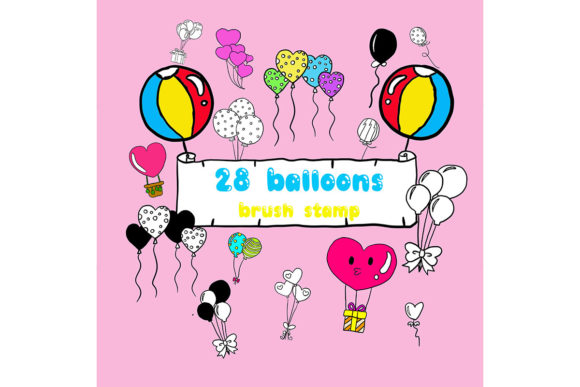
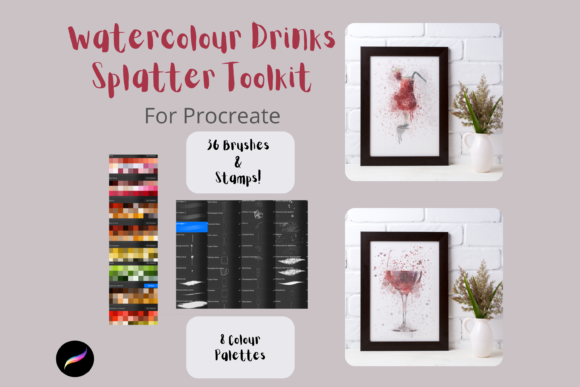
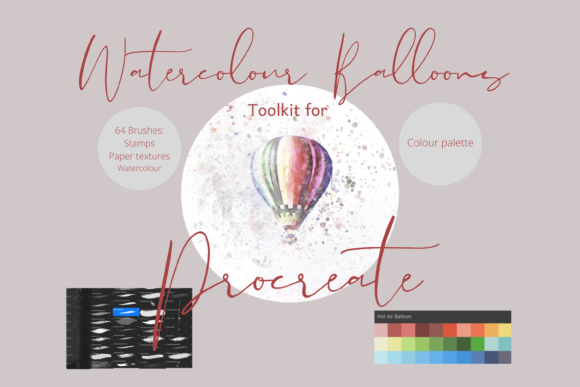
At its core, the Balloon Watercolour Toolkit Procreate is a digital asset pack containing 64 unique, hand-drawn brushes. These are not generic shapes but rather specialized tools crafted to mimic the behavior of real-world watercolor media. The collection includes dynamic brushes capable of simulating painting, blending, drips, and spatters. Additionally, it features stamp brushes and paper textures that add depth and authenticity to digital compositions.
Beyond the brushes themselves, the toolkit provides a curated Hot Air Balloon palette. This pre-selected color scheme allows users to create cohesive graphics without spending excessive time on color theory adjustments. The inclusion of clip art elements further expands the utility of the pack, offering ready-made components that can be resized and recolored. These elements serve dual purposes: they can be used as standalone decorative items or as underlying guides for custom paintings, providing a structural foundation for more complex illustrations.
Why Choose Specialized Watercolor Brushes?
Artists often seek out specialized brush sets like the Balloon Watercolour Toolkit Procreate to overcome the inherent sterility of digital canvases. Standard digital brushes can sometimes produce lines that feel too perfect or uniform, lacking the happy accidents and textural variations characteristic of traditional watercolor. This toolkit addresses that gap by introducing irregularity and organic movement into the digital stroke.
The primary benefit lies in efficiency. Creating realistic watercolor effects from scratch—manually adjusting opacity, flow, and texture for each stroke—is time-consuming. By utilizing pre-configured brushes that automatically handle blending and dripping effects, artists can achieve a high-fidelity traditional look in a fraction of the time. This is particularly valuable for professionals working on tight deadlines or hobbyists who want to focus on composition rather than technical setup.
Ideal Use Cases and Applications
The versatility of this toolkit makes it suitable for a wide range of creative projects. Because the files are digital and scalable, they are equally effective for screen-based designs and print-on-demand goods. Here are several scenarios where this toolkit proves to be a strong fit:
- Greeting Cards and Invitations: The whimsical nature of hot air balloon imagery, combined with soft watercolor textures, creates an inviting and warm aesthetic ideal for birthdays, weddings, and baby showers.
- Scrapbooking and Journaling: Digital scrapbookers can use the stamp brushes and clip art elements to decorate pages without the mess of physical glue and paint. The ability to recolor elements ensures they match any theme.
- Wall Art and Home Decor: Artists can create large-scale prints for nurseries or living spaces. The paper texture brushes help simulate the look of high-quality art paper, enhancing the perceived value of the final print.
- Wrapping Paper and Surface Design: The repeatable nature of stamp brushes allows designers to create seamless patterns for wrapping paper, fabric, or wallpaper designs.
- DIY Crafts and Print on Demand: Entrepreneurs selling custom merchandise can use these assets to design unique graphics for t-shirts, mugs, and tote bags, offering a handcrafted appeal that stands out in crowded marketplaces.
Technical Requirements and Compatibility
Before purchasing or downloading the Balloon Watercolour Toolkit Procreate, it is crucial to understand the technical constraints. These files are exclusively compatible with the Procreate app. They will not function in Adobe Photoshop, Clip Studio Paint, or other raster graphics editors. Consequently, users must possess an iPad with Procreate installed and an Apple Pencil for optimal precision and pressure sensitivity.
The installation process requires a few additional steps that may be unfamiliar to some users. Since the toolkit is delivered as a compressed file, users need a method to download and unzip the data. This typically involves using cloud storage services like iCloud and third-party unzipping applications such as iZip. Once extracted, the brushes must be imported into Procreate, where they will appear in a named folder. While this process is straightforward for experienced digital artists, beginners may need to consult tutorials to ensure proper installation.
Evaluating Tradeoffs and Considerations
While the Balloon Watercolour Toolkit Procreate offers significant advantages, it is not without tradeoffs. The most notable limitation is its platform exclusivity. Artists who prefer desktop-based workflows or who do not own an iPad cannot utilize these assets. Furthermore, while the brushes are highly customizable in terms of size and color, the underlying shape and behavior are fixed. Artists seeking complete control over every aspect of brush dynamics may find predefined sets restrictive compared to creating their own from scratch.
Another consideration is the learning curve associated with digital watercolor techniques. Having the right tools does not automatically guarantee mastery of the medium. Users must still understand layering, opacity, and blending modes to achieve realistic results. The toolkit provides the means, but the artistic skill remains the responsibility of the user.
When to Consider Alternatives
There are situations where alternative solutions may be more appropriate. If an artist requires vector-based graphics for large-format signage or logos, raster-based Procreate brushes may not be the best choice, as they can lose quality when scaled infinitely. In such cases, vector illustration software like Adobe Illustrator would be more suitable.
Additionally, if an artist already possesses a comprehensive library of general-purpose watercolor brushes, the specific thematic focus of the Balloon Watercolour Toolkit might offer diminishing returns. However, for those specifically interested in whimsical, travel-themed, or airy aesthetics, the curated nature of this pack provides a cohesive starting point that general libraries may lack.
Making the Decision
Choosing the right digital tools depends largely on your specific creative goals and existing workflow. The Balloon Watercolour Toolkit Procreate is an excellent investment for iPad-based artists who value efficiency and appreciate the charm of hand-drawn watercolor aesthetics. It is particularly well-suited for creators producing greeting cards, invitations, and print-on-demand products where a soft, organic look is desired.
However, potential users should ensure they have the necessary hardware and software infrastructure. If you are committed to the Procreate ecosystem and seek to enhance your digital painting capabilities with minimal setup time, this toolkit offers a practical and versatile solution. By weighing the convenience of pre-made assets against the flexibility of custom creation, you can determine whether this collection aligns with your artistic vision and operational needs.